Chapter 0: Getting started
Installation
Let us begin with what comes out of the box, you will need these to start popping:
- popscript.js or `popscript.min.js
This is the entire source of PopScript.
Boilerplate
PopScript is about declaring your pop ups in declarative script format.By default, PopScript offers a robust boilerplate which handles a diverse case of pops: lightboxes, context menus, tooltips, and more.To use this boilerplate, simply include the popscript-boilerplate.js file and popscript-boilerplate.css files after including popscript.js.
How to put in these files?
Installing via Bower can be done using the following command:
> bower install popscript
Your webpage would look like this:
<html>
    <head>
    ......................
    <script type="text/javascript" src="popscript.js"></script>
    ......................
    <script type="text/javascript" src="popscript-boilerplate.js"></script>
    <link rel="stylesheet" type="text/css" href="popscript-boilerplate.css" />

    ......................
    </head>
    <body>
    ......................
    <button onclick="PS.pop('hello world')">Click Me!</button>
    ......................
  </body>
</html>
OR:
<html>
    <head>
        ......................
    </head>
    <body>
        ......................
        <button id="more-info">Click Me!</button>
        ......................
    </body>

    <script type="text/javascript" src="popscript.js"></script>
    ......................
    <script type="text/javascript" src="popscript-boilerplate.js"></script>
    <link rel="stylesheet" type="text/css" href="popscript-boilerplate.css" />

    <script type="text/javascript">
        document.getElementById("more-info").onclick =
        function(){PS.pop('hello world') }
    </script>
</html>
PopScript Class
PopScript classes (aka pop classes) are very much like CSS classes. This design decision was intentional. In the popscript-boilerplate.js file we have something like this:
PS.compile({
  general: {
      STYLE: {
          CLASS: {
              box: 'simple-box',
              cover: 'curtain',
              cross: 'cross'
          }
      },
      ANIMATION: {
          IN: {
              box: 'zap-in cubic-bezier(.55,.27,.8,1.37)',
              cover: 'fade-in',
              duration: 200
          },
          OUT: {
              box: 'zap-out cubic-bezier(.55,.27,.8,1.37)',
              cover: 'fade-out',
              duration: 170
          }
      },
      POSITION: {
          x: 'auto',
          y: 'auto'
      },
      esc: 'yup',
      full_draggable: 'yes'
  },

  success: {
      STYLE: {
          CLASS: {
              box: 'success',
              cover: 'curtain'
          }
      },
      ANIMATION: {
          IN: {
              box: 'drop'
          },
          OUT: {
              box: 'undrop',
              cover: 'fade-out'
          }
      },
      POSITION: {
          y: 'top'
      },
      cross: 'no',
      full_draggable: 'naaaaoh',
      click_me_out: 'yes, tis is convenient'
  },

    ......
    ......
    ......
}
- Structure: Both PopScript and CSS have a property-value system.
- Inheritance: 2 or more CSS classes can be separated by spaces to form a chain of CSS classes which inherit from each other from the left to the right. This is the case for PopScript classes too. Example: ‘general success’.
- Case Sensitivity: Both PopScript properties and PopScript scopes are case insensitive. Which implies that ‘box’ == ‘BoX’, and ‘ANIMATION’ == ‘animation’. Note however that the values which PopScript properties refer to, and PopScript classes are case sensitive.
- Scopes: In PopScript there exists PopScript scopes, however this feature is not present in CSS.
PopScript Boolean (poolean)
In most programming languages (including JavaScript) booleans are specified by the keywords true and false, and in the language of objective C, the keywords YES and NO are used. Now given that PopScript is a HTML5 library, and is implemented in JavaScript, the obvious choice of keywords would be the native ones true and false. These 2 keywords have been chosen, however it was decided to extend these keywords. Its done with PopScript booleans which are (obviously) either true or false:
- true
- Mentioned with JavaScript boolean true
- Mentioned with any String beginning with a “y” (case insensitive). Eg: "yup", "YESS", "yEaH buddy!"`
- false
- Mentioned with JavaScript boolean false
- Mentioned with any String beginning with a “n” (case insensitive). Eg: "NOOO", "no way!", "No, I said no"
Components of a pop
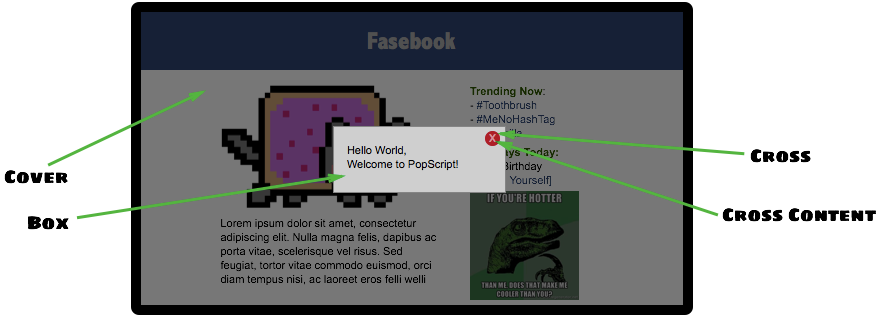
The above contains the 3 components of a pop: cover, box, cross. (cross content is not considered to be a primary component)
Terminology: pop vs Pop
pop
pop = the collection of DOM elements mentioned above in Components of a pop.
Pop
Pop = the instance returned upon calling PS.pop(), this object can be used to manipulate the pop via javascript using methods described in Chapter 2: Pop Methods.
The 2 steps: (1) Compile (2) Create
(1) Compile: PS.compile()
(2) Create: PS.pop()
parameter: pop_class
Example:
PS.pop( "success", "Your transaction was successful!");
parameter: content
Example:
PS.pop( "general", "Hello <b>World</b>" );
Example:
var info = document.createElement('div');
var header = document.createElement('h3');
header.innerText = "Your Account Balance";
var result = document.createElement('p');
result.innerText = "500 $";

info.appendChild(header);
info.appendChild(result);

PS.pop( "general", info );
Example:
PS.pop (
    "general",
    function (curPop) {
        var info = document.createElement('div');
        var header = document.createElement('h3');
        header.innerText = "Your Account Balance";
        var result = document.createElement('p');
        result.innerText = "500 $";

        info.appendChild(header);
        info.appendChild(result);

        return info;
    }
);
parameter: inline_popscript
Example:
PS.pop( "general", "You will be unable to destroy this pop by using the 'esc' key.", {esc: "no"} );
